Hardoly: A Versatile Google Slide Template for Creative Professionals
Presentations are a cornerstone of communication in business and education, but a dull, generic slide deck can undermine even the most compelling message. That's where a thoughtfully designed resource like the Hardoly - Google Slide Template comes into play, offering a powerful toolkit for anyone looking to elevate their visual storytelling. This isn't just a set of slides; it's a comprehensive design system built for clarity, impact, and creative flexibility.
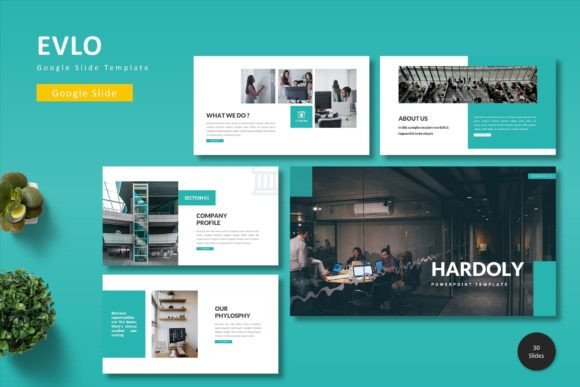
At its core, Hardoly is a premium presentation template designed for Google Slides. It provides a foundation of over 150 meticulously crafted slides, organized into five distinct color schemes. This structure gives you immediate variety while ensuring a cohesive look throughout your entire presentation. Whether you're pitching a new idea, reporting quarterly results, or teaching a complex subject, having this many professionally designed options at your fingertips saves immense time and eliminates design guesswork.
Key Features That Make It Stand Out
What truly sets this template apart is its attention to detail and user-centric design. The features are built for real-world use, not just for looking good in a preview.
- Handcrafted Infographics & Pixel-Perfect Illustrations: Move beyond basic charts. The included infographics and icons are designed to visually explain data and concepts in a more engaging, memorable way. Every graphic element is vector-based, meaning you can resize them to any dimension without losing quality—a crucial feature for high-resolution displays and printed materials.
- Intuitive Customization: Built on Master Slides, the template ensures consistent formatting across your deck. Changing fonts, colors, or logos in one place updates them globally. The drag-and-drop picture placeholder makes adding your own images a seamless process, perfect for creating portfolio showcases or case studies.
- Strategic Layouts: From dedicated section breaks that organize your narrative flow to specialized gallery and portfolio slides, the layout options support a logical and visually appealing presentation structure. This helps guide your audience's attention exactly where you want it.
Ideal Use Cases for the Hardoly Template
The versatility of this Google Slide template makes it suitable for a wide array of projects. It's an invaluable design asset for professionals who need to communicate ideas effectively and stylishly.
- Business & Marketing: Create investor pitches, marketing plans, and sales decks that look polished and authoritative. The clean, modern typography enhances brand identity and conveys professionalism.
- Creative Portfolios: Designers, photographers, and artists can use the gallery slides to present their work in a sleek, distraction-free environment that lets the visuals shine.
- Education & Training: Develop engaging course materials, workshop decks, or training modules. The variety of slide types helps break down information into digestible chunks.
- Proposals & Reports: Turn dense reports and client proposals into clear, structured documents with a professional edge that builds trust and credibility.
Tips for Choosing and Using Presentation Templates
When selecting a template like Hardoly, consider more than just its initial appeal. Think about your project's specific needs. Does the color palette align with your brand identity or the mood of your content? Test the font pairings included; ensure they are highly readable at all sizes, especially for body text. A great template should feel flexible, allowing you to adapt it to your unique voice without fighting the pre-set design.
Remember, the goal of any design asset is to serve your content, not overshadow it. A well-chosen template acts as a silent partner, providing the structure and visual consistency that allows your message to be heard clearly and remembered. It's an investment in your professional image and the effectiveness of your communication.
Choosing a resource like the Hardoly template is about more than just getting slides; it's about adopting a system that helps you present ideas with confidence, creativity, and a level of polish that resonates with any audience. It empowers you to focus on your message, secure in the knowledge that the visual framework supporting it is both beautiful and brilliantly functional.