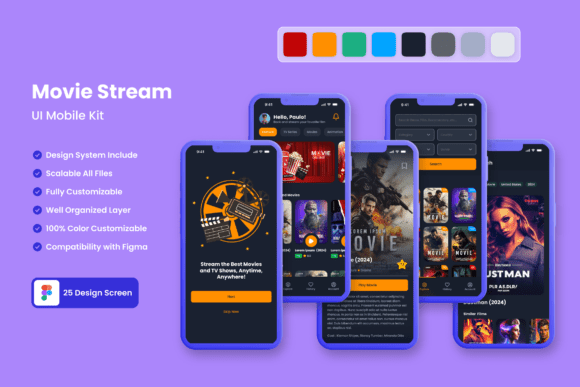
Movie Stream Application Mobile UI KIT
Imagine launching a sleek, professional movie streaming app without starting your design from scratch. The Movie Stream Application Mobile UI KIT offers exactly that—a comprehensive collection of 25 high-quality templates crafted to jumpstart your mobile application development. Whether you're a seasoned designer or a startup founder with a vision, this resource streamlines the journey from concept to polished prototype.
This UI kit is built for versatility. With over 80 UI elements, 100% vector layers, and fully scalable assets, you can adapt every screen to fit your brand's unique style. The templates are designed in Figma, making collaboration and customization straightforward. You can easily add, remove, or tweak components—like buttons, menus, and content cards—to match your project's needs. The use of free fonts and icon vectors means you won't face hidden costs or licensing hurdles for the basic design elements.
Why This UI Kit Stands Out
For designers working on entertainment, media, or content-based apps, having a pre-built design system saves countless hours. Instead of wrestling with layout grids or icon consistency, you can focus on user experience and branding. The kit's pixel-perfect screens cover common flows: onboarding, home feeds, video players, search interfaces, and profile settings. Each element is layered and organized, so even complex edits feel manageable.
Consider these practical applications:
- Rapid Prototyping: Quickly assemble clickable prototypes for client presentations or user testing.
- Brand Consistency: Apply your color palette and typography across all screens with ease, thanks to editable style guides.
- Learning Resource: New designers can study how professional UI kits structure components, spacing, and interactions.
- Startup MVPs: Founders can visualize their app idea before investing in development, helping to attract early feedback or funding.
Tips for Customizing Your Design
When adapting the templates, start by defining your brand's visual identity. Choose a color scheme that reflects your app's mood—perhaps bold contrasts for action films or soft pastels for indie cinema. The kit's easy-to-change color styles let you experiment without breaking the design's harmony. Pair the provided free font with a complementary typeface for headings to create visual hierarchy. Remember, readability is key; test text on different screen sizes to ensure clarity.
Another advantage is the kit's scalability. Because all vectors are 100% scalable, you can resize icons and illustrations for high-resolution displays without quality loss. This is especially useful for creating assets beyond the app itself, like social media graphics or promotional posters. The consistent line weights and styling help maintain a cohesive look across all platforms.
Beyond the App: Broader Design Uses
While tailored for movie streaming, the elements in this kit have wider creative potential. The clean, modern typography and interface components can inspire designs for editorial layouts, web design mockups, or even packaging design for media products. The icon set alone—featuring playback, navigation, and social symbols—is a handy asset for any digital project. If you're building a brand around video content, these templates provide a solid foundation for your visual identity.
Before finalizing your design, always review the license terms. Although the fonts and icons included are free, confirm they cover your intended use, especially for commercial projects. Also, test font pairings thoroughly; a sans-serif body font might work best for small screen text, while a display font can add flair to headings.
Ultimately, investing in a well-crafted UI kit like this one isn't just about saving time—it's about elevating your project's professionalism. A polished, intuitive interface can significantly boost user engagement and brand recognition. By starting with a versatile and editable template, you give your creative vision a stronger, more efficient path to reality.