Buildify Management Dashboard: A Modern SaaS UI Kit
Imagine a tool that transforms the chaotic world of construction project management into a clear, intuitive visual experience. That's the core promise of the Buildify Management Dashboard, a meticulously designed SaaS interface that brings order to complexity. Built for the modern proptech and contech landscape, this dashboard UI offers a clean, structured environment where every project detail has its place.
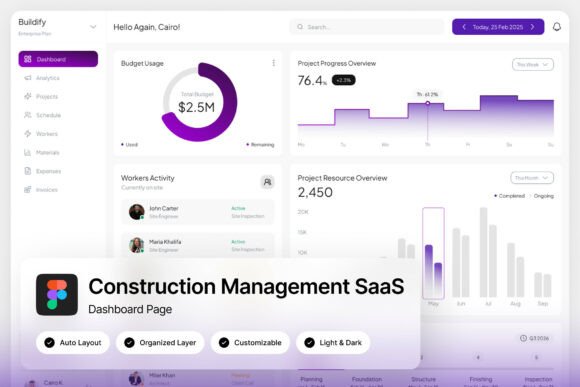
At its heart, Buildify is more than just a collection of screens; it's a comprehensive design system. The light purple-and-white theme creates a professional yet approachable aesthetic, moving away from the harsh, utilitarian look of many industry tools. This thoughtful color palette enhances readability and reduces visual fatigue, which is crucial for teams spending hours tracking progress, assigning tasks, and reviewing budgets.
Key Features for Streamlined Workflows
The layout is organized to mirror real-world construction workflows. You'll find dedicated sections for project progress trackers, task assignments, budget overviews, and detailed workforce metrics. This organization means site managers, project leads, and back-office teams can all find the information they need without digging through cluttered menus. The pixel-perfect, responsive design ensures the interface looks sharp and functions flawlessly, whether on a large office monitor or a tablet in the field.
- High-Fidelity Screens: Two complete, high-resolution (1440×1024 px) admin dashboard views provide a realistic preview of the final product.
- Easy Customization: Built in Figma, the file features well-organized, named, and grouped layers, making it simple to adapt colors, components, and layouts to match your brand identity.
- Light & Dark Modes: Includes both a light and a dark mode interface, giving your development team flexibility for user preference and different environments.
- Clean Typography: Utilizes free Google Fonts, ensuring easy implementation and no hidden licensing costs for your project.
Ideal Applications and User Scenarios
This design asset is particularly valuable for SaaS teams building project or site management platforms. Instead of starting from scratch, designers and developers can use Buildify as a robust foundation. It's perfect for field operations designers who need to create interfaces that are both powerful for data entry and intuitive for on-the-go use. The dashboard's focus on metrics and progress visualization is a natural fit for any platform where tracking completion, resources, and finances is paramount.
Beyond construction, the principles embedded in Buildify's design—clarity, hierarchy, and data visualization—are applicable to a wide range of web design projects. The structured approach to presenting complex information can inspire layouts for logistics software, asset management tools, or even advanced e-commerce dashboards. It serves as an excellent study in modern typography and UI component design.
Tips for Integrating This Design System
When incorporating a dashboard UI like this into your workflow, consider these practical steps:
- Test Readability: Always check how the typography scales. Ensure headings, body text, and data labels remain clear at all intended screen sizes.
- Match the Mood: The light purple theme conveys calm professionalism. Consider if this aligns with your brand's personality or if a simple color shift is needed.
- Explore Font Pairings: While the included Google Fonts work harmoniously, experiment with pairing them with a complementary display or sans serif font for marketing materials to create a full brand identity system.
- Verify the License: The download includes Figma files and a help guide. Review the license to ensure it fits your intended use, whether for a single client project or a commercial SaaS product.
Choosing the right design assets is about finding tools that elevate your work and streamline your process. A well-crafted system like the Buildify Management Dashboard does exactly that, providing a polished, professional foundation that can accelerate development and result in a more cohesive user experience. It’s a thoughtful investment for any team serious about building clean, efficient, and visually appealing management software.